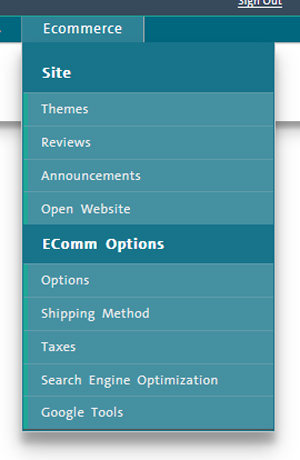
Use the options on the ecommerce menu to manage various aspects of your ecommerce solution.
On the PAYD Administration main screen, click Ecommerce.
From the ecommerce menu, you can perform the following management functions:
NOTE: Depending on your user permissions, some functionality may be disabled or greyed out.
● Themes - Use the Themes screen to design your ecommerce website directly within PAYD Pro Plus.
● Reviews - Use the Reviews tool to see feedback left by online customers. You can decide whether the feedback will be visible or hidden.
● Announcements - Use this tool to create and manage announcements for customers on your ecommerce website.
● Open Website - Use this option to launch your ecommerce website within a separate web browser.
For merchants using the PAYD Pro Plus ecommerce module, there is also an expanded list of ecommerce configuration tools visible as well.
● Options - Configure ecommerce module and website behaviours.
● Shipping Method - Configure the various shipping methods for items purchased from your PAYD Pro Plus ecommerce website.
● Taxes - Configure tax rules and rates for items sold and shipped from the PAYD Pro Plus ecommerce website.
● Search Engine Optimization - Configure rules to optimize the PAYD Pro Plus ecommerce website for search engines.
● Google Tools - Link to Google Analytics tools to monitor ecommerce website performance.
● Click Options on the menu.
● see Setting Ecommerce Options for more help.
● Click Themes on the menu.
● see Managing Ecommerce Website Themes for more help.
● Click Reviews on the menu.
● see Adding Reviews to the Website for more help.
● Click Shipping Method on the menu.
● see Defining Ecommerce Shipping Methods for more help.
● Click Taxes on the menu.
● see Setting Ecommerce Tax Rules for more help.
● click the Search Engine Optimization button on the left side of the screen.
● see Search Engine Optimization for more help.
● Click Google tools on the menu.
● see Google Analytics for more help.
● see Publishing the Ecommerce Website for more help.
● Click Open Website on the menu.
● see Opening Ecommerce Website for more help.